
Duplicate data refers to records that are repeated or redundant within a dataset. It is one of the most common data quality issues organizations face, often leading to inaccurate reporting, unreliable analytics, and poor business decisions.
SAP HANA (High-Performance Analytic Appliance) is an in-memory, multi-model database widely used for real-time analytics and enterprise workloads. Because SAP HANA is frequently used for mission-critical reporting, identifying exact match duplicates in tables is essential for maintaining high data quality.
In May 2024, I wrote a guide on how to find exact match duplicates in SAP HANA tables https://techiejackieblogs.com/how-to-find-exact-match-duplicates-in-sap-hana-tables/. I am updating the post with a more optimized query you’ll learn how to find exact match duplicate rows in SAP HANA tables using SQL, with a clear example and step-by-step explanation.
What Are Exact Match Duplicates in SAP HANA?
Exact match duplicates occur when the same value (or combination of values) appears more than once in a table column. Common examples include:
- Duplicate customer names
- Repeated product codes
- Multiple records with the same identifier
SAP HANA provides powerful window functions that make identifying these duplicates efficient and scalable.
Example: Create a Sample SAP HANA Table
To demonstrate how duplicate detection works, let’s create a sample EMPLOYEES table and insert example data.
CREATE TABLE EMPLOYEES (
    EMPLOYEE_ID INTEGER,
    FIRST_NAME VARCHAR(100),
    LAST_NAME VARCHAR(100)
);

INSERT INTO EMPLOYEES VALUES (595,'Larisa','Awcoate');
INSERT INTO EMPLOYEES VALUES (80,'Joshuah','Brigginshaw');
INSERT INTO EMPLOYEES VALUES (817,'Bobinette','Brigginshaw');
INSERT INTO EMPLOYEES VALUES (459,'Alain','Feander');
INSERT INTO EMPLOYEES VALUES (809,'Arabele','Flatley');
INSERT INTO EMPLOYEES VALUES (956,'Perry','Flatley');
INSERT INTO EMPLOYEES VALUES (221,'Vasili','Geck');
INSERT INTO EMPLOYEES VALUES (749,'Madelle','Gemmill');
INSERT INTO EMPLOYEES VALUES (763,'Lizette','Gemmill');
INSERT INTO EMPLOYEES VALUES (372,'Gunner','Hackly');
INSERT INTO EMPLOYEES VALUES (166,'Darlene','Haggeth');
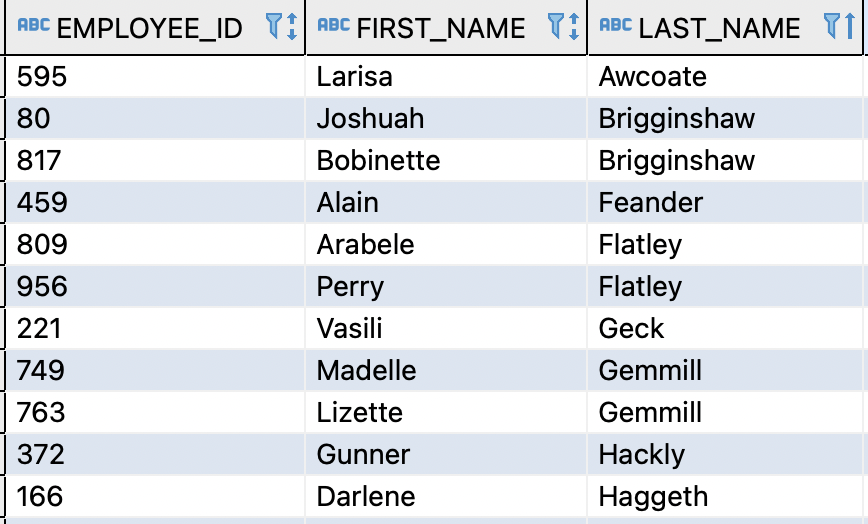
In this dataset, several LAST_NAME values appear more than once, making them exact match duplicates.
SQL Query to Find Exact Match Duplicates in SAP HANA
The following SQL query identifies duplicate values in the LAST_NAME column:
SELECT
    DENSE_RANK() OVER (ORDER BY LAST_NAME) AS key_id,
    LAST_NAME
FROM (
    SELECT
        COUNT(*) OVER (PARTITION BY LAST_NAME) AS cnt,
        LAST_NAME
    FROM EMPLOYEES
)
WHERE cnt > 1;
How This SAP HANA SQL Query Works
1. Count Occurrences Using a Window Function
The inner query uses the COUNT() window function to calculate how many times each LAST_NAME appears:
SELECT
    COUNT(*) OVER (PARTITION BY LAST_NAME) AS cnt,
    LAST_NAME
FROM EMPLOYEES;
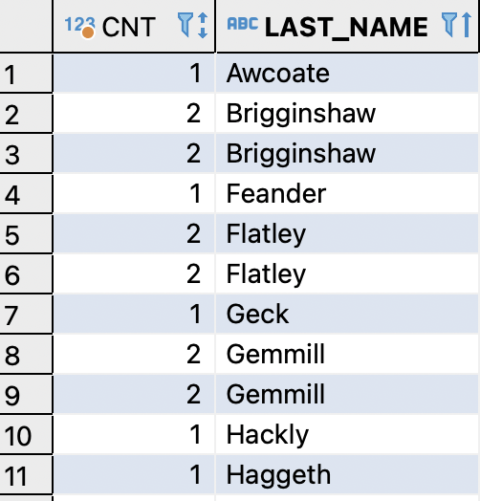
This returns:
- Every
LAST_NAME - The number of rows containing that value
2. Assign Duplicate Group IDs with DENSE_RANK
For the outer query, the DENSE_RANK() function assigns a unique identifier to each duplicate group:
DENSE_RANK() OVER (ORDER BY LAST_NAME) AS key_id
- Rows with the same
LAST_NAMEreceive the sameKEY_ID - Each duplicate group is easy to identify and analyze
3. Filter Only Duplicate Rows
The outer query filters the results:
WHERE cnt > 1
This ensures that only exact match duplicates are returned.
Final Output Explanation
The final result includes:
- KEY_ID – Identifies each duplicate group
- LAST_NAME – The duplicated value
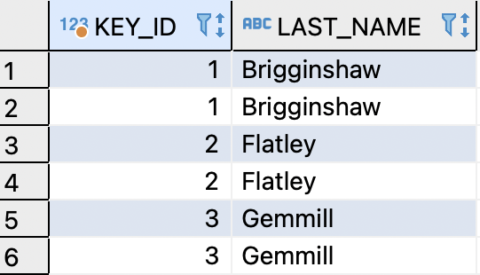
This output is useful for:
- Data quality audits
- Identifying records to delete or merge
- Joining back to the source table for remediation
When to Use This Method
This approach is ideal when you need to:
- Find exact match duplicates in SAP HANA
- Perform data quality checks
- Prepare datasets for analytics or reporting
- Detect duplicates in large SAP HANA tables efficiently
With small modifications, this query can also be extended to:
- Multiple columns
- Case-insensitive matching
- NULL handling
Problems with the current query
COUNT(*) OVER(PARTITION BY LAST_NAME ORDER BY LAST_NAME)computes a window function on the full table, which can be expensive.- The inner query is scanning all rows, even those with unique
LAST_NAMEs. DENSE_RANK()on top of a large table adds another full sort, which can be costly.
Optimized Approach
Instead of computing a window function for all rows, first aggregate to find duplicates, then rank them. This reduces row processing:
SELECT DENSE_RANK() OVER(ORDER BY LAST_NAME) AS key_id,
       LAST_NAME
FROM (
    SELECT LAST_NAME
    FROM EMPLOYEES
    GROUP BY LAST_NAME
    HAVING COUNT(*) > 1
) AS duplicates
ORDER BY LAST_NAME;
✅ Why this is better
GROUP BY LAST_NAME+HAVING COUNT(*) > 1immediately filters only the duplicates.- No window function on every row — much faster on very large tables.
DENSE_RANK()is applied only to the filtered duplicates, so the sort is much smaller.- Reduces memory and CPU usage on large datasets.
Optional Further Optimization for Large Tables
If LAST_NAME is not indexed, consider adding an index:
CREATE INDEX idx_employees_lastname ON EMPLOYEES(LAST_NAME);
This can significantly speed up the GROUP BY aggregation.
Final Optimized Query
SELECT DENSE_RANK() OVER(ORDER BY LAST_NAME) AS key_id,
       LAST_NAME
FROM (
    SELECT LAST_NAME
    FROM EMPLOYEES
    GROUP BY LAST_NAME
    HAVING COUNT(*) > 1
) AS duplicates
ORDER BY LAST_NAME;
💡 Performance Tip: For very large tables, consider creating a materialized view of duplicates if you query them frequently.
Summary
Finding exact match duplicates in SAP HANA tables is simple and efficient using SQL. By combining COUNT() and DENSE_RANK(), you can quickly identify duplicate values without complex joins or subqueries. This method scales well for large datasets, is easy to read and maintain, and works natively in SAP HANA. For even better performance on massive tables, consider using GROUP BY with HAVING COUNT(*) > 1, adding indexes on relevant columns, or creating materialized views to streamline repeated queries. With these strategies, you can efficiently detect duplicates, simplify data remediation, and maintain a clean, trustworthy dataset ready for accurate reporting and reliable analytics.