
Overview
Ensuring data quality is a critical responsibility for data engineers, analytics engineers, and platform teams. One of the core data quality dimensions is consistency, which often manifests as format validation—verifying that values follow expected patterns.
In Google BigQuery, large datasets frequently contain values with inconsistent formats due to manual data entry, system integrations, or legacy migrations. Phone numbers, in particular, are prone to formatting issues.
This guide demonstrates how to detect non-conforming data formats in BigQuery using SQL, while safely masking sensitive values. The approach is scalable, privacy-aware, and suitable for production data quality checks.
Problem Statement: Validating Phone Number Formats
Assume your organization defines the following valid U.S. phone number formats:
nnn-nnn-nnnn(nnn)nnn-nnnn
In practice, datasets often contain additional formats such as:
- Numbers with extensions
- Text embedded in phone numbers
- International prefixes
- Extra punctuation or whitespace
Your objective is to:
- Identify records that do not conform to the accepted formats
- Avoid exposing sensitive phone numbers
- Provide enough context for remediation
Solution Approach
We will use Google BigQuery SQL to:
- Query a public dataset
- Apply pattern-based data masking
- Filter out records that match valid formats
- Surface only non-standard phone number entries
Dataset Used
This tutorial uses a BigQuery public dataset:
bigquery-public-data.sdoh_hud_housing.2017_lihtc_database_hud
Relevant Columns
| Column | Description |
|---|---|
hud_id | HUD project identifier |
project | Project name |
co_tel | Contact phone number (unstandardized) |
Why Data Masking Matters in Data Quality Checks
Phone numbers are personally identifiable information (PII). Even when working with public datasets, exposing raw values is a bad practice.
Common data masking techniques include:
- Redaction
- Substitution
- Shuffling
- Encryption or tokenization
- Masking with patterns
In this tutorial, we use pattern-based masking, which preserves the structure of the data while hiding actual values. This allows analysts to evaluate formats without seeing sensitive information.
BigQuery SQL Query
SELECT
  hud_id,
  project,
  REGEXP_REPLACE(
    REGEXP_REPLACE(SAFE_CAST(co_tel AS STRING), '[A-Za-z]', 'x'),
    '\\d',
    'n'
  ) AS masked_phone_number,
  LENGTH(CAST(co_tel AS STRING)) AS length_phone_number
FROM `bigquery-public-data.sdoh_hud_housing.2017_lihtc_database_hud`
WHERE REGEXP_REPLACE(REGEXP_REPLACE(SAFE_CAST(co_tel AS STRING), '[A-Za-z]', 'x'), '\\d', 'n')
NOT IN ('nnn-nnn-nnnn', '(nnn)nnn-nnnn')


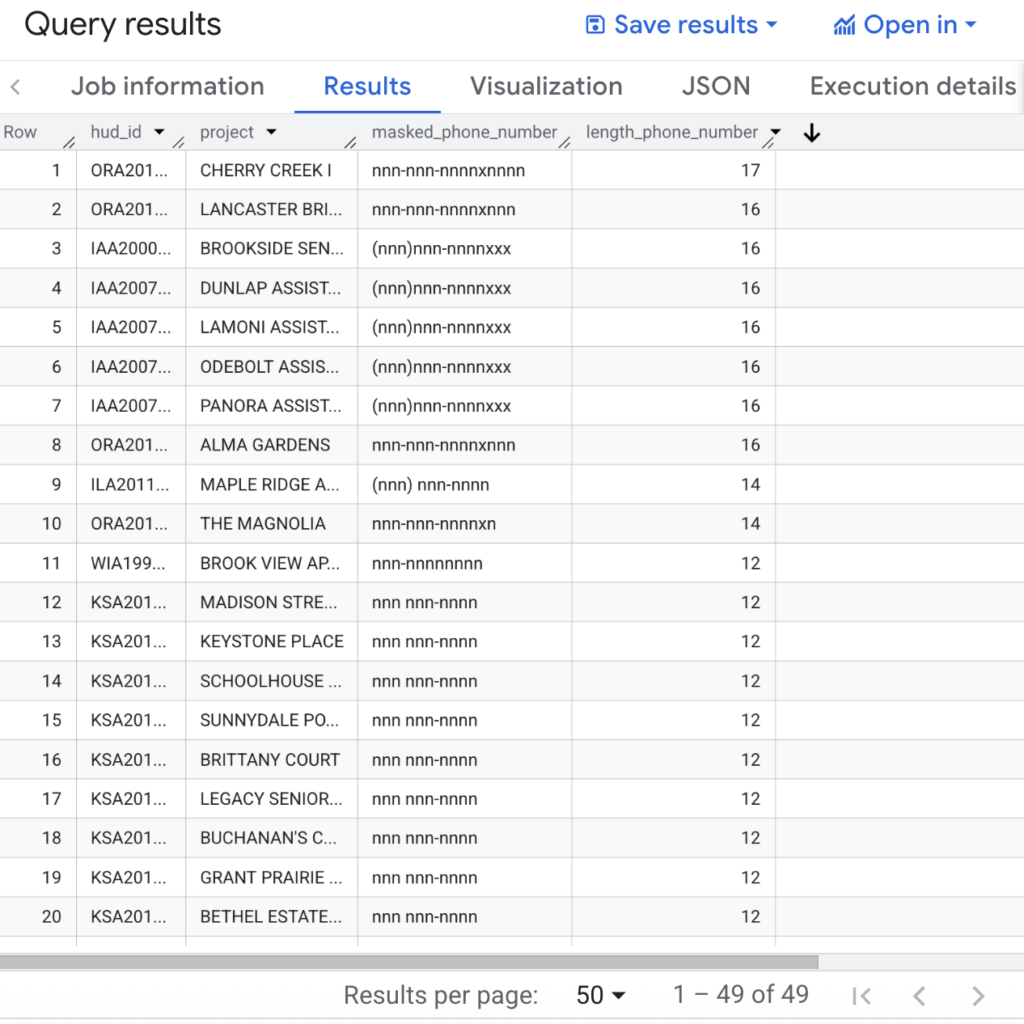
Here is the actual results of the above query:
Query Explanation
Step 1: Safe Casting to STRING
SAFE_CAST(co_tel AS STRING)
- Ensures consistent string processing
- Prevents query failures caused by malformed or NULL values
Step 2: Mask Alphabetic Characters
REGEXP_REPLACE(..., '[A-Za-z]', 'x')
Purpose:
Replaces all letters with x.
Example:
1-800-FLOWERS → 1-800-xxxxxxx
Step 3: Mask Numeric Digits
REGEXP_REPLACE(..., '\\d', 'n')
Purpose:
Replaces all digits (0–9) with n.
Example:
415-555-1234 → nnn-nnn-nnnn
Resulting Masked Output
| Element | Masked As |
|---|---|
| Digits | n |
| Letters | x |
| Symbols | Preserved |
This preserves the format structure while masking actual values.
Calculating Phone Number Length
LENGTH(CAST(`co_tel` AS STRING)) AS length_phone_number
This helps:
- Identify extensions
- Detect trailing text
- Spot malformed or truncated values
- Provide metadata for data remediation
Filtering Valid Formats
WHERE REGEXP_REPLACE(REGEXP_REPLACE(SAFE_CAST(co_tel AS STRING), '[A-Za-z]', 'x'), '\\d', 'n') NOT IN ('nnn-nnn-nnnn', '(nnn)nnn-nnnn')
This removes records that match the approved formats, leaving only unexpected or invalid entries.
Example Results
| Original Value | Masked Output | Included |
|---|---|---|
415-555-1234 | nnn-nnn-nnnn | ❌ No |
(415)555-1234 | (nnn)nnn-nnnn | ❌ No |
1-800-FLOWERS | n-nnn-xxxxxxx | ✅ Yes |
+1 (415) 555-1234 ext 9 | +n (nnn) nnn-nnnn xxx n | ✅ Yes |
Type of Data Masking Used
This approach uses masking with patterns, not redaction.
Why this matters:
- Sensitive values are hidden
- Format consistency can still be evaluated
- Results are safe to share with analysts and stakeholders
Practical Applications
This technique is commonly used for:
- Data quality consistency checks
- Phone number and email validation
- Auditing public or shared datasets
- PII-safe data profiling
- Automated data quality monitoring in BigQuery
Key Takeaways
- Data format validation is a fundamental data quality check
- BigQuery regex functions enable scalable format analysis
- Pattern-based masking balances privacy and usability
- This method generalizes to ZIP codes, emails, IDs, and dates